

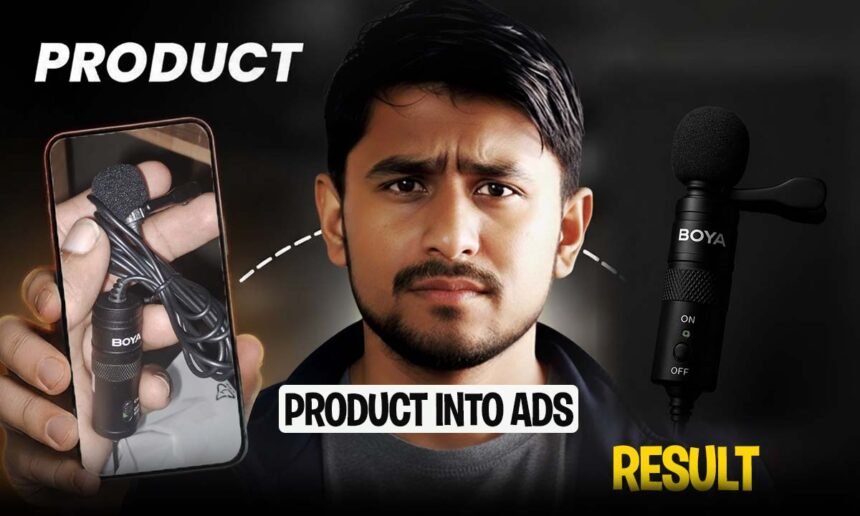
Do you have a product but don’t have an expensive studio to show it off? Or do you want a simple mobile photo of your product to turn into a professional ad?
So now it’s all possible — absolutely free!
Yes, just with the help of ChatGPT.
How to Turn Your Product Photo into a Professional Ad
Step 1: Go to ChatGPT
First, go to ChatGPT.
This is the platform where you can upload your product photo and turn it into a professional ad.
Step 2: Upload Your Product Photo
Take a clear photo of the product with your mobile — whether it’s your mic, cup, dress, or anything else.
Then upload that photo to ChatGPT.
Tip: If the photo is taken with a mobile phone, try to make the lighting a little better. ChatGPT will do the rest of the magic!
Step 3: Give This Prompt
Now enter this prompt in ChatGPT:
“Zoom in tightly on the product, focusing on the texture and details. Use soft key light from the top-left to create a professional ad look. Background should be dark grey, ratio 9:16 for social media ads.”This prompt will turn your uploaded image into a professional ad photo.
That is, what looked ordinary before — now becomes a brand.
And if you want to use my Prompt, you can use that too, but you have to change the name of your product in it, just like if you have a mouse instead of a mic, you have to write mouse there, and if you want to change it with minor changes, you can do that too. Similarly, you can convert your images to professional image using ChatGPT.
Zoom in tightly on the Boya By M1, focusing on the Mic and the curvature around the thumb rest. The frame should include only a portion of the Mic — extreme close-up. Use the uploaded product image exactly as it is — do not change or stylize any part of the Mic, including shape, logo, text, material, or color. All details must remain 100% realistic and untouched. The intent is to highlight the tactile experience and refined material quality.

Use a soft key light from the top-left to create gentle specular highlights on the Mic texture. Capture the subtle transition between matte and semi-gloss surfaces of the Mic body, especially around the sculpted lines. Shadows should fall smoothly into the backdrop, allowing the texture and finish of the plastic and rubber to speak.

The background can be a deep desaturated neutral like slate grey or charcoal, defocused with light falloff toward the edges.

This is a micro-level ad shot — meant for carousel middle slides, or to showcase engineering and tactile build quality.
format: Vertical
Style: Macro elegance
Color: Monochrome grey palette
Lighting: Focused soft key light
Angle: Extreme close-up crop
Ratio: 9:16
Step 4: Download Your Ad
In a few seconds, ChatGPT will create an image in front of you that looks like it came out of an ad company’s studio.
You can use this image on Instagram, Facebook, TikTok, or any platform.
Step 5: Post and See Engagement
When you post your new product ad on social media, you will see that engagement will be many times higher than before.
Because photos created with ChatGPT:
- Look cleaner
- Lighting is balanced
- And the focus on the product is great
Who Can Benefit from This Method?
This technique is especially great for those who:
- Don’t have a professional studio
- No camera or lighting setup
- But want to show off your product in a professional way
Whether you’re a small business owner, online seller, or freelancer — this tool can give you the results of a pro field shoot at zero cost.
Final Words
You no longer need to spend money on a graphic designer or studio.
Simply open ChatGPT, upload your product image, give a great prompt — and that’s it!
Your product ad is ready.
That’s what “Turn Product into Ads for Free” really means.
Try it today and see how your simple photo becomes a production-level ad.